
How to restrict access to records to only specific users
Configuring the Permissions for app setting and the Permissions for records setting, you can restrict access to records to only specific users.
For instance, if you want to restrict the ability to view, edit, and delete a record to only the user who created the record, configure the Permissions for app setting and the Permissions for records setting as described below:
-
The Permissions for app setting
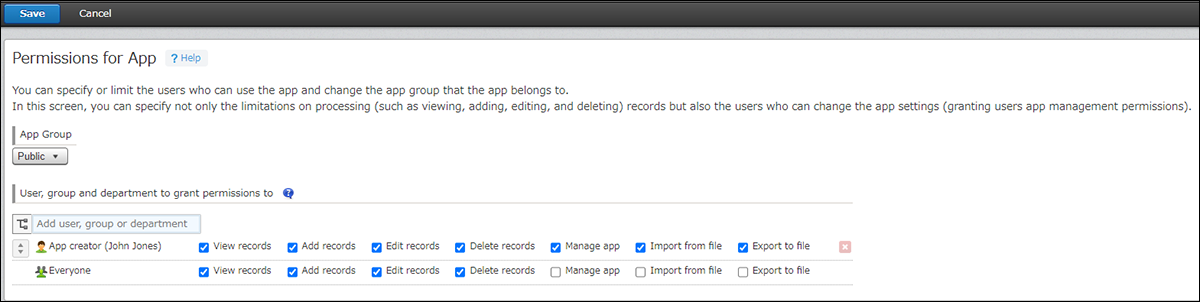
App creator [✔] View records [✔] Add records [✔] Edit records [✔] Delete records Everyone [✔] View records [✔] Add records [✔] Edit records [✔] Delete records By default, the setting is configured as described above.
-
The Permissions for records setting
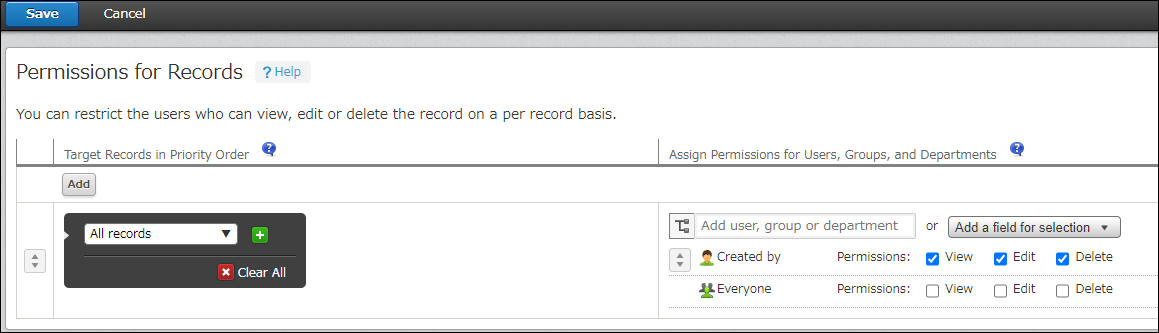
Target records in priority order Assign permissions for users, groups, and departments All records Created by [✔] View [✔] Edit [✔] Delete Everyone [ ] View [ ] Edit [ ] Delete