Changing group name or group code
This page describes how to change group (or role) information such as group name and group code.
You cannot change the membership type (Static or Dynamic).
-
Access cybozu.cn administration.
Accessing cybozu.cn administration -
Click Groups (or roles).
-
On the group whose information you want to change, click the gear-shaped icon.
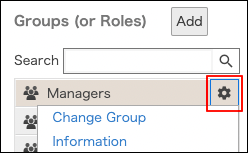
-
Click Change group information.
-
Change the group name or group code.
Items of group information -
Click Save.