Deleting groups
This page describes how to delete groups (or roles).
Notes on deleting groups
- You cannot undo the deletion of the group.
- Access permissions using the deleted group will be disabled.
- Deleting a group does not delete the user accounts under the group.
- The groups created by the system cannot be deleted.
Steps
-
Access cybozu.cn administration.
Accessing cybozu.cn administration -
Click Groups (or roles).
-
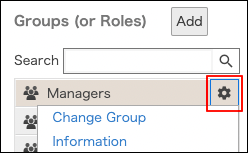
On the group you want to delete, click the gear-shaped icon.
-
Click Delete.
-
On the confirmation screen, click Delete.