Changing the department members
This page describes how to change the department members.
The maximum number of department members
The maximum number of department members is 10,000.
Adding members
-
Access cybozu.cn administration.
Accessing cybozu.cn administration -
Click Departments & users.
-
On the department to which you want to add members, click the gear-shaped icon.
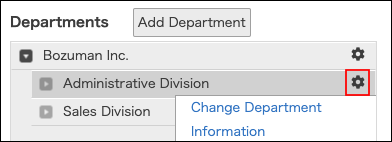
-
Click Change members.
-
In the search box, enter the display name or login name of the user to find the target user.
You can also find the user by expanding the department tree. -
Select a user.
You can select multiple users.
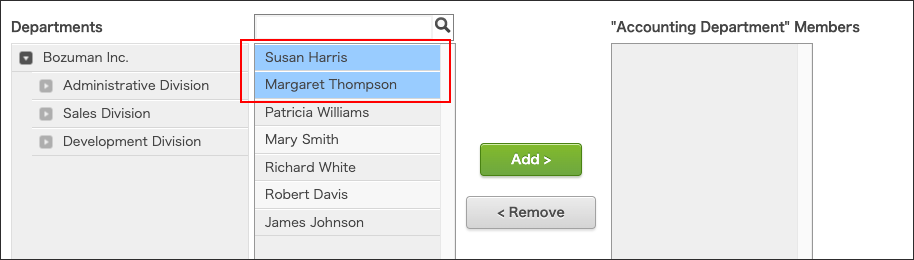
-
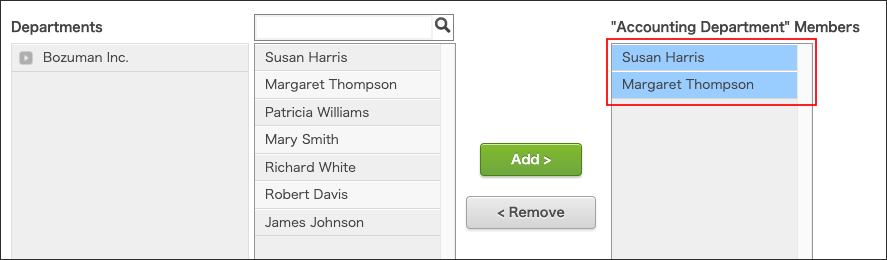
Click Add.
The selected users are displayed in "Members in 'selected department'". -
Click Save.
Deleting members
-
Access cybozu.cn administration.
Accessing cybozu.cn administration -
Click Departments & users.
-
On the department from which you want to delete members, click the gear-shaped icon.
-
Click Change members.
-
Select a user.
You can select multiple users.
-
Click Remove.
The selected users are removed from "Members in 'selected department'". -
Click Save.