Configuring the Update options setting
This page describes how to activate or deactivate new features of cybozu.cn administration in Update options.
Steps
-
Access cybozu.cn administration.
Accessing cybozu.cn administration -
Click Update options.
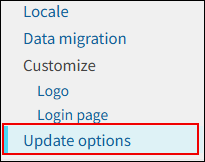
-
In Activate/deactivate the feature, select Activated or Deactivated for the desired feature.

-
Click Save.