Changing department hierarchy
This page describes how to change hierarchical structure of departments.
Changing parent department
-
Access cybozu.cn administration.
Accessing cybozu.cn administration -
Click Departments & users.
-
On the department whose parent department you want to change, click the gear-shaped icon.
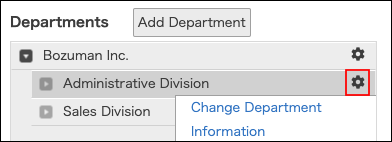
-
Click Change department information.
-
Click the tree icon in Parent department, and expand the tree to select a department.

-
Select a parent department.
To configure a top-level department as the parent department, select (Root). -
Click Save.
Adding child departments
-
On the department to which you want to add a child department, click the gear-shaped icon.
-
Click Add child department.
-
Enter the values such as department name and department code.
-
Click Save.